
Mega888 Login (Log Masuk): How to Sign In to Your Account
Mega888 login guide: sign in with the Player ID and password you were given. This page goes through the login screen field by field, then covers Login Failed and a forgotten password.
Log in step by step Cara log masuk Mega888
- Open the app and let it finish loading. The first screen can show “Updating new data” with a progress figure. Wait for it to finish before you type anything.
- Enter your username (Player ID). Type it exactly as your agent gave it. Mind capital letters and the difference between the number 0 and the letter O.
- Enter your password. Type it, do not paste it from a chat unless you must. If it was a temporary password, you should change it after your first login.
- Choose your language. The screen has a language box; ours showed English.
- Tap Login. If it works, you land in the game lobby. If not, go to Login Failed.
The login screen, field by field
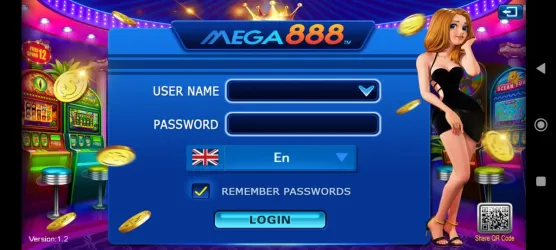
This is the Mega888 login screen on version 1.2. The numbers match the list underneath.
 1234567
Screenshot of the Mega888 app login screen.
- 1USER NAME: a dropdown, so it can remember IDs used before
- 2PASSWORD: your password, typed here
- 3Language: the box under the password
- 4Remember Passwords: saves your login on this phone
- 5Login: sends your ID and password
- 6QR code: shown on the screen; we did not scan it, so we cannot say what it does
- 7Version number: version 1.2 here; useful when you ask for help
- Read the login screen on version 1.2 and the top 10 results for “mega888 login” in Malaysia
- Create an account or sign in
- Confirm any website as the operator’s own
Use Remember Passwords only on a phone that only you use. On a shared or borrowed phone, leave it off.
Login Failed: fixes in order Login gagal, tak boleh login
Symptom, cause, fix
| You see | Likely cause | What to try |
|---|---|---|
| “Login Failed” at once | Wrong ID or password, caps lock, a copied space | Retype both by hand. If it fails twice, stop and check with your agent. |
| Stays on “Updating new data” | Weak or interrupted connection | Switch between Wi-Fi and mobile data, then close and reopen |
| App closes by itself | Low storage, a damaged install or an old version | Free space, restart the phone, check the version shown on the login screen |
| Works for other people, not for you | The account is locked or suspended, or the password changed | Ask the agent who issued the account |
| Locked after several wrong tries | The account protects itself after repeated failures | Wait, then contact the agent. One page in the results says to contact support. |
| Exit confirmation appears | You pressed back or the exit button | Choose No to stay in the app |
What to try, in order
- Retype the ID and password. By hand, with caps lock off.
- Close and reopen the app. Swipe it out of recent apps first.
- Change network. Try Wi-Fi, then mobile data.
- Restart the phone.
- Clear the app cache. Settings > Apps > Mega888 > Storage > Clear cache. Menu names vary by phone. Do not choose Clear data unless you know your login.
- Check the version. It is shown at the bottom-left of the login screen (1.2 in our screenshot). Give it to your agent when you ask for help.
- Ask your agent. Give your Player ID and what the screen says. Never give your password.
Stuck on Updating new data
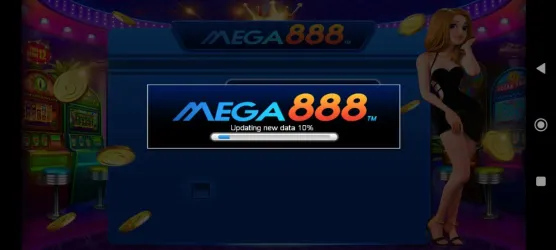
The loading screen shows a progress bar with the words Updating new data.
The app checks for data when it opens. If the progress stops, a poor connection is the most likely reason. Wait a minute, then change network and try again. If it is stuck every time, free up storage and restart the phone.
What not to do
- Do not install an app or “patch” sent by someone in a chat group.
- Do not pay anyone to unlock or recover the account.
- Do not give your password or a one-time code to anyone.
- Do not keep trying files from different pages until one works.
Forgot password: recover your account Lupa kata laluan
Recover access in order
- Check the basics. Caps lock, the number 0 against the letter O, and a stray space copied with the password. Retype both fields by hand.
- Look for a saved password. If you used Remember Passwords on this phone, the username box may offer your ID from its dropdown. If your phone or browser has a password manager, check it.
- Find the agent who issued the account. Use the same chat you used when you got the ID. Give your Player ID, not your bank or card details.
- Ask for a temporary password. Log in with it straight away.
- Change it. Pick a password you do not use anywhere else.
Recovery scams
- Messages you offering to recover or unlock your account for a fee
- Asks for your OTP, your banking login or remote access to your phone
- Tells you that you must send money first to “verify” the account
- Sends you to a website that asks for your Mega888 ID and password
If you have already paid or shared a code, see what to do if you have been scammed.
After you are back in
- Change the password and keep it to yourself.
- Do not tick Remember Passwords on a shared phone.
- Run through the account security checklist.
Keep your account safe Keselamatan akaun
- Never give your password or a one-time code to anyone, including someone who says they are support.
- Change a temporary password after your first login.
- Do not enter your Mega888 password on a website. The app is where you log in.
- Be careful of any message that contacts you first with a login link.
More in the account security checklist and how to spot fake websites and agents.
Questions people ask
Where do I get a Mega888 Player ID?
Pages in the results describe getting one through an agent. See the register guide. We do not create accounts.
Is there an official Mega888 login website?
We could not confirm one. Be careful with any web page that asks for your Mega888 ID and password. The app is where the login screen lives.
Can I log in on two phones?
We could not confirm the rule. Ask the agent who issued the account, and do not share your login.
Why does the app say Updating new data?
It checks for data when it opens. A poor connection can make it slow or stuck. Wait, then try another network.
Can I reset my Mega888 password by email?
We found no email reset on the login screen of version 1.2. Pages in the results describe the agent resetting it.
The agent will not reply. What now?
Do not pay anyone else to recover it. Keep trying the same chat, and treat any new person who offers help as a risk.
Can I recover an account without the agent?
We could not find a way. If you find a page that says it can, treat it as a scam until proven otherwise.
Will I lose my balance if I cannot log in?
We do not know how balances are held. Ask the agent who issued the account, and do not send money to be able to ask.
Why does Mega888 say Login Failed when the password is right?
Check for a hidden space, the wrong ID, or an account the agent has locked. A weak connection can also fail the check.
Will clearing the cache log me out?
It can. Make sure you know your ID and password first.
How many wrong tries lock the account?
We could not find a figure. Stop after two failures and ask your agent.
Is it a problem with my phone?
Test another app on the same network. If other apps work, the cause is more likely the account or the app data.
Keep reading
Sources
- Mega888 app login screen, version 1.2 (screenshot on this site)
- Top 10 Google results in Malaysia for “mega888 login”, read 3 November 2026
This site is an information guide. It does not run games, hold accounts or create accounts for you. Gambling is for adults aged 18 and over: see responsible gambling.